KB Article #5515
If customers are not receiving reminder emails for appointments, double-check your Email Reminder settings. Note: Reminder emails are only sent to bookings which have been confirmed.
To check Email Reminder settings:
- Click Workshop settings from the Workshop menu option.

- Click Change.

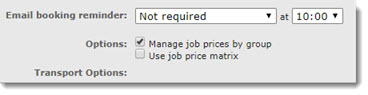
- Select a new option from the Email booking reminder. Note: Selecting Not required will prevent Vauxhall Online booking from sending reminder notification emails.
- Click Update when ready.
- For more information on setting up email reminders, click here.